
3D Printing
News Deals Contact us
Home / How to / Post-processing 3D printed Objects with DIY Ultrasonic Vapor Polisher
qidi

Post-processing 3D printed Objects with DIY Ultrasonic Vapor Polisher

Vapor polishing is a process when you apply vapors of a solvent to a 3D printed object to increase surface quality or smoothness. You basically polish out visible layering and small imperfections by gently dissolving them in solvent vapors. Here is a list of some solvents that can be used to polish different 3D printing filaments and materials:

  • ABS: Acetone
  • Acrylic: Most Solvents
  • PLA: MEK or ‘MEK Substitute’
  • PVA: Water
  • PVC: Most Solvents

Since Acetone is widely available it is often used to polish ABS parts with this procedure:

Vapor polishing methods were very rough and improvised until the Ultrasonic Vapor Polisher was developed and published on Instructables by a user named “Michael“.

It is made with simple parts like a glass jar, an empty metal paint can, an aquarium air pump and some rescued components from a household ultrasonic humidifier.

Instead of heating to produce dangerous vapors or dipping the object in cold solvent, it uses vibrations to produce a fine solvent mist in a sealed container.

Here is his project description from the Instructables page:

The current vapor polishing methods and their drawbacks include:

  • Hot treat via boiling solvent in a crock pot or similar chamber (Potentially dangerous and very hands-on process)
  • Cold treat via slow release of solvent from paper towels in an enclosed container (Very time consuming, can’t observe parts during this process.)
  • Spray canned solvent aerosol onto part. (Inconsistent surface finish, must be done outside)
  • Dipping parts directly into liquid solvents (Unpredictable/inconsistent finish, Likely over exposure of part)

All I wanted is a machine that lets me quickly drop parts into a transparent container and be able to press ‘go’ and have the machine produce a predictable finish on its own. I do not want to have to put together a really involved setup that may be a fire hazard, fume hazard, or something that produces unpredictable surface finishes. Essentially I want something as convenient as a microwave. I’m also forgetful so I don’t want my parts to be destroyed if I forget that I left them in the machine.
The Ultrasonic Misting 3D Vapor Polisher is the solution to all of these problems.
This key component of this machine comes from ultrasonic humidifier, which uses a piezoelectric transducer (like a speaker) to create a high frequency mechanical oscillation in a liquid. This vibration forms an extremely fine mist of droplets in a fog/mist. The density of the fog is controlled by varying the intensity of the vibrations via a potentiometer.
This fog mist is very dense and won’t move far on its own, so I used an aquarium air pump to blow it from the misting chamber into the glass finishing chamber where it can condense on the 3D printed part. This airflow keeps the air moving inside the finishing chamber, which helps produce a consistent finish on the part. The airflow system is open by necessity but we do not want the exhaust air to become a fume hazard so there is a water bubbler on the exhaust to absorb excess solvent. (Note that this only protects you when using water miscible solvents such as acetone.)

This is the final setup of the Do-It-Yourself apparatus:

ultrasonic setup
DIY Ultrasonic Vapor Polisher. Image source: Instructables

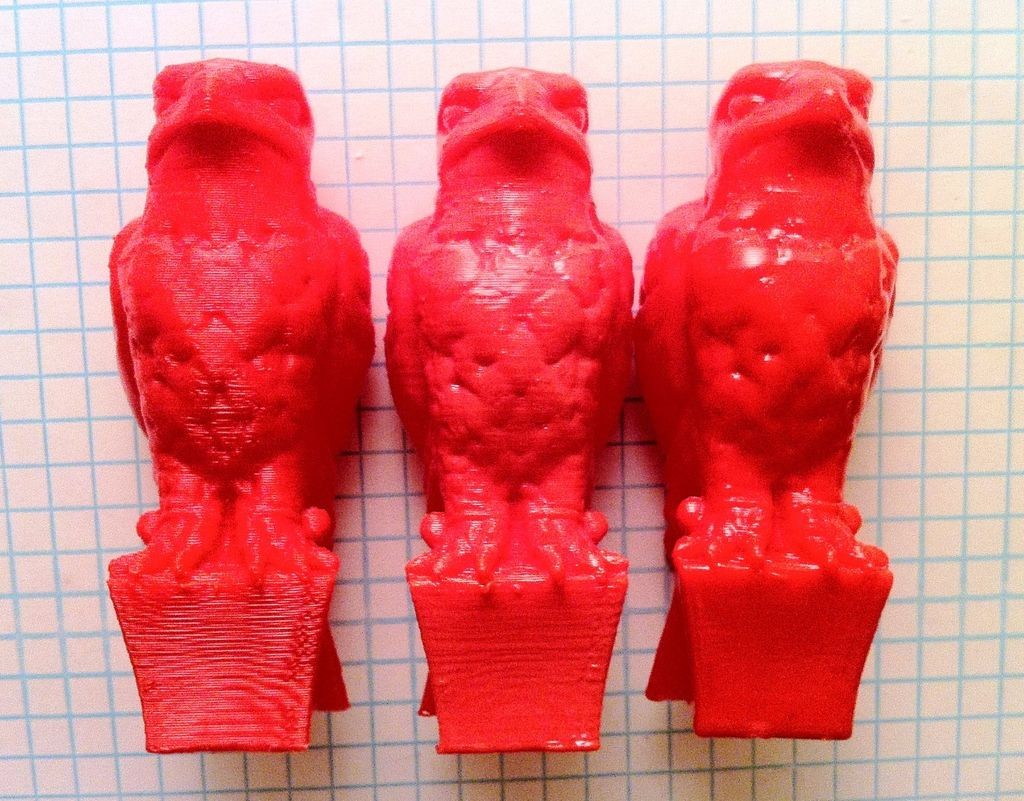
Processed objects look like this:

ultrasonic results
On the far right is a 3D printed objects vapor polished in the ultrasonic mist polisher. You can clearly see it is much smoother and shinier than the non-treated one on the far left. Image source: Instructables

If you want to make this device, a very detailed construction tutorial can be found at Instructables project page:

http://www.instructables.com/id/Ultrasonic-Misting-3D-Printing-Vapor-Polisher/

Video demonstration of the Polisher and material testing on his DIY TestrBot are very interesting:

Do keep in mind that the strength of your object will be negatively affected by this chemical polishing technique. Also be very aware that this process can be dangerous and most of the solvents are toxic when inhaled or in contact with skin and / or flammable under some conditions. DO NOT MIX ANY SOLVENTS and clean the apparatus well before switching to a different chemical! STAY SAFE and consult the project instructions! Let us know what are your experiences with vapor polishing in the comments below!

Related Story
Post-Processing FDM 3D Prints
building 3d printer from scratch
Related Story
Building a 3D Printer from Scratch
Share:
WhatsApp Twitter Facebook LinkedIn Buffer Reddit E-mail
About the author | Lav Radis
Entrepreneur and 3d printing enthusiast from Croatia. Blogging about 3d printing and digital manufacturing since 2011.
Join our newsletter

Our newsletter is free & you can unsubscribe any time.

Latest posts

SUTD Researchers 3D Print Polymer Color Routers for Brighter Low-Light Photos

Singapore University of Technology and Design researchers have 3D printed polymer color routers that steer light to sensor pixels instead of absorbing it.

News

MIT Software Embeds Sensors in 3D Printed Lamps, Gloves and Toys

MIT and Tianjin University software embeds sensors in 3D printed hinges. The objects can sense motion along up to three axes.

News

Revopoint RANGE 3 Series Opens for Pre-Order as MIRACO 2 Heads to Kickstarter

Revopoint launches two scanner lines on October 22: the RANGE 3 Series, two lightweight wide-field scanners from $369 now on pre-order, and MIRACO... read more »

News

Milan Researchers Turn Soybean Waste Into 3D Printable Skin Repair Material

Milan researchers blended peptides from okara, a soybean by-product, into biodegradable polycaprolactone, and the blend kept its healing activity once printed.

Materials

CNC Kitchen’s Free ScanRuler Lets AI Agents Turn 3D Scans Into Parametric CAD

CNC Kitchen YouTuber Stefan Hermann's free ScanRuler tool now lets an artificial intelligence agent rebuild 3D scans as editable, parametric design models.

News

Additive Industries and Materialise Launch Faster MetalFab Build Processor

The Next-Generation Build Processor for MetalFab metal printers brings MetalFab 420K scan controls and multiprocessing, and is available to customers now.

3D Printing Metal

LAIKA Picks PrismSlicer to Preview Its Full-Color 3D Prints

LAIKA, the stop-motion studio behind Coraline and Kubo and the Two Strings, has agreed to add PrismSlicer, a photorealistic preview tool from Prague... read more »

News

TCT Shenzhen 2026 Draws 34,347 Visitors, Up 85 Percent on Its Last Edition

TCT Shenzhen 2026 closed on October 16 with 34,347 unique visitors over three days, up 85 percent on the previous edition, according to... read more »

Events

RMIT Prints Architectural Forms With Coffee Waste Filament

RMIT researchers turned spent Melbourne coffee grounds into a stronger, biodegradable printing material and a full-scale demonstrator for Melbourne Design Week.

Materials

De Montfort University Fellowship Backs 3D Printed Artificial Muscles for Soft Robots

A Royal Academy of Engineering fellowship gives De Montfort University's Meisam Abdi up to a year to print piezoelectric muscles for safer soft... read more »

News

Social

  • Facebook Facebook 3D Printing
  • Linkedin Linkedin 3D Printing
Join our newsletter

Our newsletter is free & you can unsubscribe any time.

  • Anycubic Photon Mono M7

    • - Print size: 223 x 126 x 230 mm
    • - 10.1 inch 14K screen
    More details »
    $279.00 Anycubic
    Buy Now
  • Creality K2 Plus

    • - Print size: 350 x 350 x 350 mm
    • - multi-color printing
    More details »
    $1,199.00 Creality
    Buy Now
  • Snapmaker U1

    • - Print size: 270 x 270 x 270 mm
    • - multi-color printing with SnapSwap
    More details »
    $849.00 Snapmaker
    Buy Now
  • Flashforge Adventurer 5M

    • - Print size: 220 x 220 x 220 mm
    • - 600mm/s travel speed
    More details »
    $299.00 Flashforge
    Buy Now
  • Qidi Max 4

    • - Print size: 390 x 390 x 340 mm
    • - active cooling air control
    More details »
    $1,219.00 Qidi
    Buy Now
  • Flashforge Guider 3 Ultra

    • - Print size: 330 x 330 x 600 mm
    • - dual extruder system
    More details »
    $2,999.00 Flashforge
    Buy Now
  • Flashforge AD5X

    • - Print size: 220 x 220 x 220 mm
    • - dual extrusion system
    More details »
    $399.00 Flashforge
    Buy Now
  • Creality Hi Combo

    • - Print size: 260 x 260 x 300 mm
    • - up to 16-color printing
    More details »
    $399.00 Creality
    Buy Now
  • Anycubic Kobra S1 Combo

    • - Print size: 250 x 250 x 250 mm
    • - budget multicolor printing
    More details »
    $429.00 Anycubic
    Buy Now
  • Qidi Q2

    • - Print size: 270 x 270 x 256 mm
    • - enclosed heated chamber up to 65°C
    More details »
    $580.00 Qidi
    Buy Now

Company Information

  • What is 3D Printing?
  • Contact us
  • Join our mailing list
  • Advertise with us
  • Media Kit
  • Nederland 3D Printing

Blog

  • Latest News
  • Use Cases
  • Reviews
  • 3D Printers
  • 3D Printing Metal

Featured Reviews

  • Anycubic Photon Mono M5s
  • Creality Ender 5 S1
  • The Mole 3D Scanner
  • Flashforge Creator 3 Pro

Featured Industries

  • Automotive
  • Aerospace
  • Construction
  • Dental
  • Environmental
  • Electronics
  • Medical
  • Military
  • Fashion
  • Art
2026 — Strikwerda en Dehue
  • Home
  • Join our mailing list
  • Contact us
Blog
  • Latest News
  • Use Cases
  • Reviews
  • 3D Printers
  • 3D Printing Metal
Featured Industries
  • Automotive
  • Aerospace
  • Construction
  • Dental
  • Environmental
  • Electronics
  • Medical
  • Military
  • Fashion
  • Art
Company Information
  • What is 3D Printing?
  • Contact us
  • Join our mailing list
  • Advertise with us
  • Media Kit
  • Nederland 3D Printing